For AI-assisted coding workflows

Your terminal failures, remembered automatically.

VibeBug is a local-first CLI that detects build, test, lint, and runtime failures in real time — across JavaScript, TypeScript, Python, Rust, Go, and common build tools. See what keeps breaking, what came back, and what debugging is costing you.

Works with your normal terminal workflow. No cloud. No account. No interruption. See how it works ›

Why it exists

Vibe coding moves fast.
Terminal failures disappear faster.

When you code with AI, failures pile up quickly.

A build breaks. A test fails. A dev server throws an error. You fix one thing, move on, and two hours later the same issue is back — but now it feels new again.

Most of the problem is not just the failure itself. It's the lack of memory around it.

You lose the error in terminal scrollback. You forget what already happened. You repeat the same debugging loop. And if you are using AI to help fix things, the cost keeps stacking quietly in the background.

VibeBug gives your terminal a memory.

terminal

$ npm run build

Error: Cannot find module './components/Auth'

→ scrolled past, forgotten

$ npm run build

Error: Cannot find module './components/Auth'

→ same error, 2 hours later

$ pytest

FAILED tests/test_api.py::test_auth - fixture error

→ broke again after "fix"

no history · no grouping · no memory

What VibeBug does

A local-first CLI that quietly tracks failures while you work.

VibeBug wraps your normal terminal commands and watches for failures in real time. It catches non-zero exit codes, detects runtime errors from terminal output — even from long-running processes like dev servers — and automatically classifies each failure as build, test, lint, or runtime. It works across JavaScript, TypeScript, Python, Rust, Go, and common build tools. You keep using your tools as usual.

terminal
$ vb npm run build
$ vb pytest
$ vb cargo test

Same commands. Same output. More visibility.

How it works

Simple in practice.
Useful over time.

No config files. No accounts. No cloud. Just prefix your commands.

1

Prefix with vb

Run your usual build, test, or dev commands through VibeBug. If they fail, VibeBug captures it automatically.

$ vb npm run build

$ vb pytest

$ vb cargo test

2

Failures Are Captured

VibeBug catches non-zero exit codes and detects runtime errors from terminal output in real time — even from long-running dev servers. Each failure is automatically classified as build, test, lint, or runtime, and recurring issues are grouped together.

$ vb npm run build

ERR! Cannot find module

 ✓ Failure captured

 ↻ Recurring issue grouped

3

See What Breaks

Open the local dashboard to see recurring failures, regressions, failing commands, and estimated AI debugging cost.

$ vb dash

 ► Dashboard at localhost:7600

Why it matters

See the problems that keep costing you time.

Spot recurring failures

See which issues keep returning instead of treating every failure like a brand-new problem.

Catch regressions

When something breaks again after being fixed, VibeBug flags it so it does not silently re-enter the loop.

Understand AI debugging cost

Estimate how much repeated failures are costing you in AI-assisted debugging.

Keep useful context

Track failure history with command, git context, and fixes so debugging does not start from zero every time.

Local dashboard

A clearer view of what keeps breaking.

VibeBug includes a local dashboard that turns terminal noise into something you can review and learn from. See open captures, recurring failures, regressions, fix history, failing commands, and project-level patterns in one place.

localhost:7600
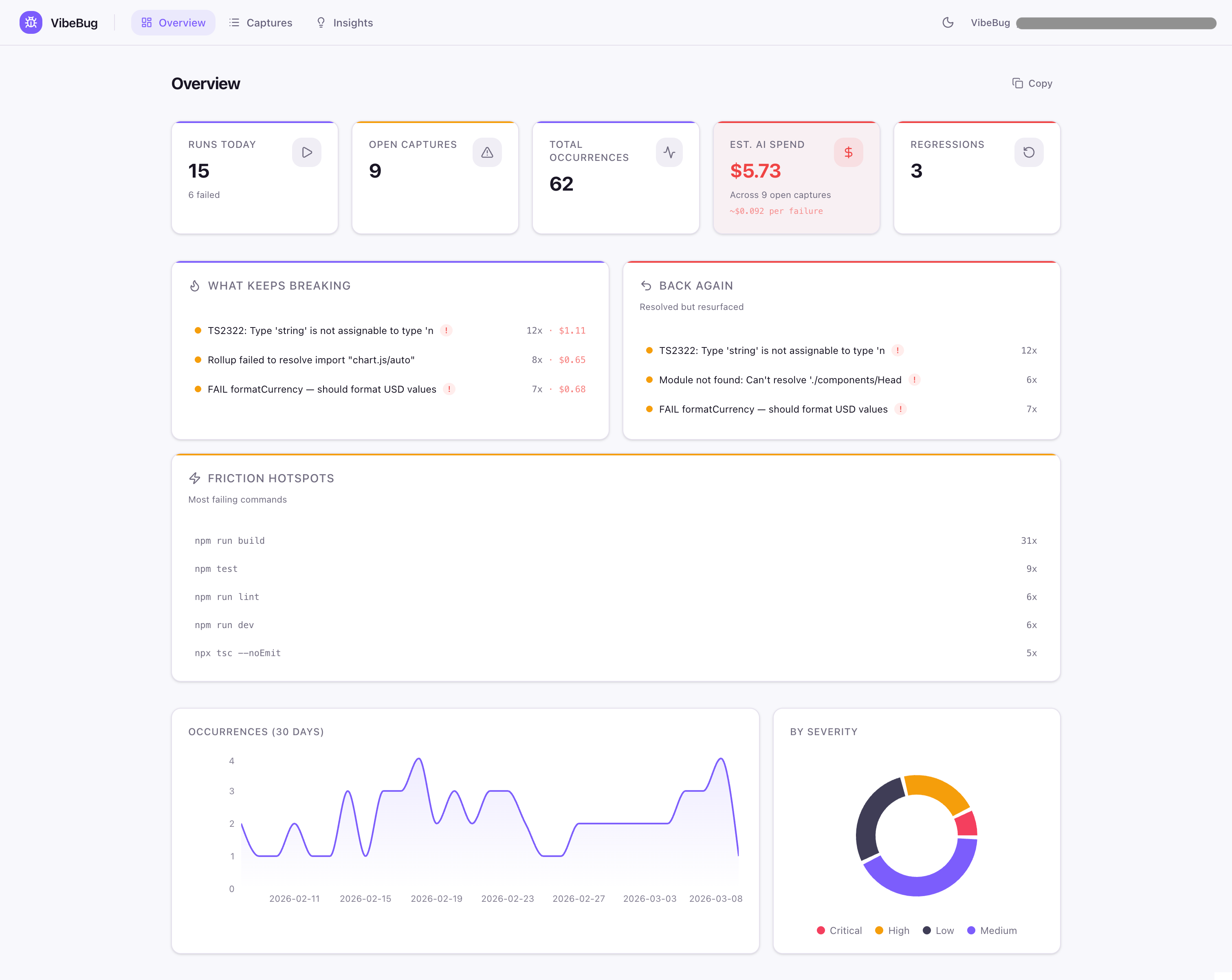
VibeBug dashboard showing captured failures, regressions, and debugging insights
Core commands

Useful in the terminal. Not just in the dashboard.

vb <command>

Run a command while VibeBug watches for failures

vb dash

Open the local dashboard

vb list

View captured failures in the terminal

vb fix --last

Record what fixed the latest failure

vb summary

Generate a shareable project failure summary

vb export

Export data as JSON, CSV, or Markdown

vb ignore

Suppress noisy patterns

terminal

# just code normally

$ vb npm run dev

# failures captured in the background

Runtime error detected → captured

↻ Grouped with 3 previous occurrences

# check anytime

$ vb list

 3 open · 1 regression · 2 recurring

no forms · no tickets · no context switch

Why VibeBug feels different

Built for flow, not extra process.

Most debugging tools ask you to stop what you are doing and report something manually.

VibeBug takes the opposite approach.

It works passively in the background while you keep coding. No account setup. No cloud dependency. No issue-filing ceremony. No forced workflow change.

It is designed for developers who want more visibility without adding more overhead.

Local-first

Your failure data stays with you.

VibeBug stores its data locally in your project. No cloud account is required. When you generate summaries or exports, sensitive details like paths and tokens can be sanitized to make sharing safer.

Fast to start

One install, one init

Easy to trust

Open source, MIT licensed

Stays local

SQLite in your project

Share-safe

Sanitized exports

No cloud by default. No account required. Share on your terms.

vb summary
VibeBug Summary — my-project
Runs: 14 today (5 failed) · 312 total
Open: 3 · Resolved: 2 · Regressions: 1
Est. AI spend: $2.43
Top failing commands
  npm run build (7 failures)
  pytest (3 failures)

Who it's for

Built for developers who code fast, run lots of terminal commands, and want to stop rediscovering the same failures.

AI-assisted coding workflows Indie builders Open-source tool makers Fast-moving side projects

What you get

A compact, share-safe summary of what keeps breaking, what came back, and where debugging time is going.

Useful for personal review, team context, or sharing what actually keeps breaking.

AI-heavy workflows

Failures pile up fast with AI coding

Terminal-heavy builds

Lots of commands, lots of output

Repeat failures

Same bugs keep coming back

Zero overhead

No workflow change needed

FAQ

No. Your command runs normally and output still flows through the terminal as expected.

No. VibeBug is local-first and stores data locally by default.

No. You just prefix commands with vb and keep working as usual.

No, but it is especially useful for AI-assisted workflows where failures are frequent, repeated, and easy to lose in terminal output.

Yes. Summaries and exports are designed to be share-safe, with sanitization for sensitive details.

VibeBug captures failed commands (non-zero exit codes) and also detects runtime errors from terminal output in real time — including from long-running processes like dev servers that don't exit on error. It recognizes patterns across many languages and tools (JavaScript, TypeScript, Python, Rust, Go, and common build tools), and automatically classifies each failure as a build, test, lint, or runtime error based on the command that triggered it.

Every time VibeBug captures a failure, it estimates how many tokens the error log would consume and calculates an approximate cost based on current model pricing (Claude Sonnet by default). It's a rough estimate for visibility — not a billing tool — designed to help you spot which recurring failures are eating the most AI debugging effort.

Know what keeps breaking.
Fix it once. Notice when it comes back.

VibeBug helps you turn terminal failures into useful memory — without slowing down how you build.

npm install -g vibebug
Star on GitHub Open Source · MIT Licensed

Local-first CLI • No account • Built for fast AI-assisted coding workflows